
GitLab CI/CD : Guide Complet des Pipelines Avances
GitLab CI/CD est l'un des systemes d'integration et de deploiement continu les plus puissants du marche. Avec plus de 30 millions de developpeurs l'utilisant, il offre une solution complete integree directement dans votre gestionnaire de code source.
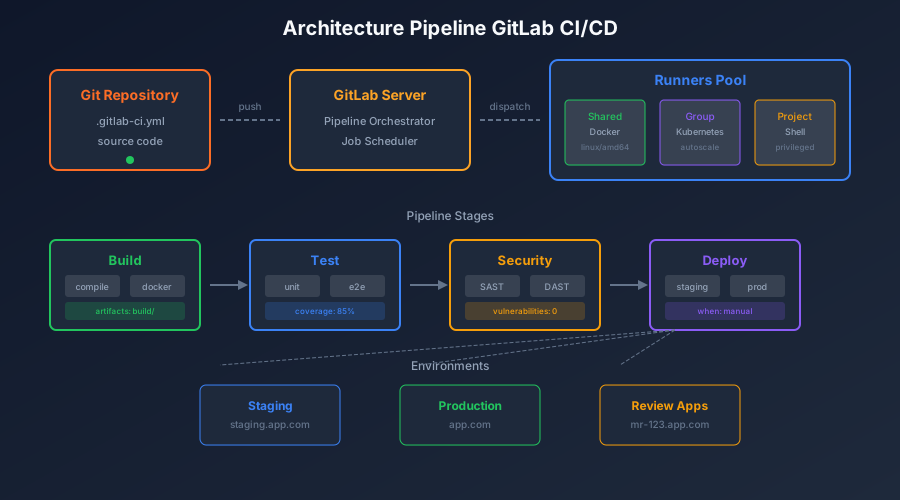
Fondamentaux du .gitlab-ci.yml
Le fichier .gitlab-ci.yml est le coeur de votre configuration CI/CD. Il definit les stages, jobs, et regles d'execution.
Structure de Base
# .gitlab-ci.yml
stages:
  - build
  - test
  - security
  - deploy

variables:
  DOCKER_DRIVER: overlay2
  DOCKER_TLS_CERTDIR: "/certs"

default:
  image: node:20-alpine
  tags:
    - docker
  before_script:
    - npm ci --cache .npm --prefer-offline
  cache:
    key: ${CI_COMMIT_REF_SLUG}
    paths:
      - .npm/
      - node_modules/

# Jobs definis ci-dessous...
Variables et Secrets
GitLab offre plusieurs niveaux de variables :
variables:
  # Variables globales
  NODE_ENV: production

  # Variables expandees
  DEPLOY_PATH: /var/www/${CI_PROJECT_NAME}

# Utilisation de secrets (definis dans Settings > CI/CD)
deploy_job:
  script:
    - echo "$DEPLOY_KEY" > ~/.ssh/id_rsa
    - chmod 600 ~/.ssh/id_rsa
    - scp -r ./dist $DEPLOY_USER@$DEPLOY_HOST:$DEPLOY_PATH
Configuration Avancee des Jobs
Jobs Paralleles et Matrice
test:
  stage: test
  parallel:
    matrix:
      - NODE_VERSION: ["18", "20", "22"]
        DATABASE: ["postgres", "mysql"]
  image: node:${NODE_VERSION}-alpine
  services:
    - name: ${DATABASE}:latest
      alias: db
  script:
    - npm test
  coverage: '/Coverage: \d+\.\d+%/'
Rules et Conditions
deploy_staging:
  stage: deploy
  rules:
    # Deploy auto sur develop
    - if: $CI_COMMIT_BRANCH == "develop"
      when: always
    # Deploy manuel sur feature branches
    - if: $CI_COMMIT_BRANCH =~ /^feature\//
      when: manual
      allow_failure: true
    # Jamais sur main (utiliser deploy_production)
    - if: $CI_COMMIT_BRANCH == "main"
      when: never
  script:
    - ./deploy.sh staging

deploy_production:
  stage: deploy
  rules:
    - if: $CI_COMMIT_TAG =~ /^v\d+\.\d+\.\d+$/
      when: manual
  environment:
    name: production
    url: https://myapp.com
  script:
    - ./deploy.sh production
Needs et DAG (Directed Acyclic Graph)
stages:
  - build
  - test
  - deploy

build_frontend:
  stage: build
  script:
    - npm run build:frontend
  artifacts:
    paths:
      - dist/frontend/

build_backend:
  stage: build
  script:
    - npm run build:backend
  artifacts:
    paths:
      - dist/backend/

test_frontend:
  stage: test
  needs: [build_frontend]  # N'attend pas build_backend
  script:
    - npm run test:frontend

test_backend:
  stage: test
  needs: [build_backend]   # N'attend pas build_frontend
  script:
    - npm run test:backend

deploy:
  stage: deploy
  needs:
    - job: test_frontend
      artifacts: true
    - job: test_backend
      artifacts: true
  script:
    - ./deploy.sh
Gestion des Runners
Types de Runners
| Type | Utilisation | Avantages |
|---|---|---|
| Shared | Tous les projets | Simple, maintenu par GitLab |
| Group | Projets d'un groupe | Partage au niveau equipe |
| Project | Un seul projet | Isolation complete |
Configuration d'un Runner Docker
# /etc/gitlab-runner/config.toml
concurrent = 10
check_interval = 0

[[runners]]
  name = "docker-runner"
  url = "https://gitlab.com/"
  token = "YOUR_TOKEN"
  executor = "docker"

  [runners.docker]
    tls_verify = false
    image = "alpine:latest"
    privileged = true
    disable_entrypoint_overwrite = false
    oom_kill_disable = false
    disable_cache = false
    volumes = [
      "/cache",
      "/var/run/docker.sock:/var/run/docker.sock"
    ]
    shm_size = 0

  [runners.cache]
    Type = "s3"
    Path = "gitlab-runner-cache"
    Shared = true

    [runners.cache.s3]
      ServerAddress = "s3.amazonaws.com"
      BucketName = "my-runner-cache"
      BucketLocation = "eu-west-1"
Runner Kubernetes
[[runners]]
  name = "kubernetes-runner"
  url = "https://gitlab.com/"
  token = "YOUR_TOKEN"
  executor = "kubernetes"

  [runners.kubernetes]
    namespace = "gitlab-runner"
    image = "alpine:latest"

    [[runners.kubernetes.volumes.host_path]]
      name = "docker-socket"
      mount_path = "/var/run/docker.sock"
      host_path = "/var/run/docker.sock"

    [runners.kubernetes.node_selector]
      "node-role.kubernetes.io/ci" = "true"

    [runners.kubernetes.pod_annotations]
      "prometheus.io/scrape" = "true"
Optimisation des Performances
Caching Intelligent
variables:
  PIP_CACHE_DIR: "$CI_PROJECT_DIR/.pip-cache"
  NPM_CONFIG_CACHE: "$CI_PROJECT_DIR/.npm-cache"

.cache_template: &cache_template
  cache:
    key:
      files:
        - package-lock.json
        - requirements.txt
      prefix: ${CI_JOB_NAME}
    paths:
      - .npm-cache/
      - .pip-cache/
      - node_modules/
      - venv/
    policy: pull-push

build:
  <<: *cache_template
  script:
    - npm ci
    - npm run build

test:
  <<: *cache_template
  cache:
    policy: pull  # Ne met pas a jour le cache
  script:
    - npm test
Artifacts Optimises
build:
  stage: build
  script:
    - npm run build
  artifacts:
    name: "$CI_JOB_NAME-$CI_COMMIT_REF_SLUG"
    paths:
      - dist/
    exclude:
      - dist/**/*.map
      - dist/**/*.LICENSE.txt
    expire_in: 1 week
    when: on_success
    reports:
      junit: coverage/junit.xml
      coverage_report:
        coverage_format: cobertura
        path: coverage/cobertura-coverage.xml
Docker Layer Caching
build_image:
  stage: build
  image: docker:24
  services:
    - docker:24-dind
  variables:
    DOCKER_BUILDKIT: 1
  before_script:
    - docker login -u $CI_REGISTRY_USER -p $CI_REGISTRY_PASSWORD $CI_REGISTRY
  script:
    - |
      docker build \
        --cache-from $CI_REGISTRY_IMAGE:latest \
        --build-arg BUILDKIT_INLINE_CACHE=1 \
        -t $CI_REGISTRY_IMAGE:$CI_COMMIT_SHA \
        -t $CI_REGISTRY_IMAGE:latest \
        .
    - docker push $CI_REGISTRY_IMAGE:$CI_COMMIT_SHA
    - docker push $CI_REGISTRY_IMAGE:latest
Security Scanning
Pipeline de Securite Complet
include:
  - template: Security/SAST.gitlab-ci.yml
  - template: Security/Dependency-Scanning.gitlab-ci.yml
  - template: Security/Secret-Detection.gitlab-ci.yml
  - template: Security/Container-Scanning.gitlab-ci.yml
  - template: Security/DAST.gitlab-ci.yml

sast:
  stage: security
  variables:
    SAST_EXCLUDED_PATHS: "spec, test, tests, tmp"
    SEARCH_MAX_DEPTH: 10

dependency_scanning:
  stage: security
  variables:
    DS_EXCLUDED_ANALYZERS: "gemnasium-python"

container_scanning:
  stage: security
  variables:
    CS_IMAGE: $CI_REGISTRY_IMAGE:$CI_COMMIT_SHA
    CS_SEVERITY_THRESHOLD: "HIGH"

dast:
  stage: security
  needs: [deploy_staging]
  variables:
    DAST_WEBSITE: https://staging.myapp.com
    DAST_FULL_SCAN_ENABLED: "true"
Trivy Scanner Custom
trivy_scan:
  stage: security
  image:
    name: aquasec/trivy:latest
    entrypoint: [""]
  script:
    - trivy image --exit-code 1 --severity HIGH,CRITICAL $CI_REGISTRY_IMAGE:$CI_COMMIT_SHA
  allow_failure: false
Environments et Review Apps
Configuration des Environments
deploy_review:
  stage: deploy
  script:
    - kubectl apply -f k8s/review-app.yaml
    - kubectl set image deployment/review-app app=$CI_REGISTRY_IMAGE:$CI_COMMIT_SHA
  environment:
    name: review/$CI_COMMIT_REF_SLUG
    url: https://$CI_COMMIT_REF_SLUG.review.myapp.com
    on_stop: stop_review
    auto_stop_in: 1 week
  rules:
    - if: $CI_MERGE_REQUEST_IID

stop_review:
  stage: deploy
  script:
    - kubectl delete -f k8s/review-app.yaml
  environment:
    name: review/$CI_COMMIT_REF_SLUG
    action: stop
  rules:
    - if: $CI_MERGE_REQUEST_IID
      when: manual
Blue-Green Deployment
.deploy_template: &deploy_template
  image: bitnami/kubectl:latest
  before_script:
    - kubectl config use-context $KUBE_CONTEXT

deploy_blue:
  <<: *deploy_template
  stage: deploy
  script:
    - kubectl apply -f k8s/blue-deployment.yaml
    - kubectl set image deployment/app-blue app=$CI_REGISTRY_IMAGE:$CI_COMMIT_SHA
    - kubectl rollout status deployment/app-blue --timeout=300s
  environment:
    name: production-blue
    url: https://blue.myapp.com

switch_traffic:
  <<: *deploy_template
  stage: deploy
  needs: [deploy_blue]
  script:
    - kubectl patch service app-production -p '{"spec":{"selector":{"version":"blue"}}}'
  environment:
    name: production
    url: https://myapp.com
  when: manual
Pipelines Multi-Projets
Trigger Pipeline Enfant
# Parent pipeline
trigger_deploy:
  stage: deploy
  trigger:
    project: mygroup/deploy-configs
    branch: main
    strategy: depend
  variables:
    APP_VERSION: $CI_COMMIT_SHA
    APP_NAME: $CI_PROJECT_NAME

# Dans mygroup/deploy-configs/.gitlab-ci.yml
deploy:
  script:
    - echo "Deploying $APP_NAME version $APP_VERSION"
    - helm upgrade --install $APP_NAME ./charts/$APP_NAME --set image.tag=$APP_VERSION
Pipeline Dynamique
generate_jobs:
  stage: .pre
  script:
    - |
      cat > generated.yml << EOF
      $(for service in $(ls services/); do
        echo "${service}_test:"
        echo "  stage: test"
        echo "  script:"
        echo "    - cd services/${service} && npm test"
      done)
      EOF
  artifacts:
    paths:
      - generated.yml

run_tests:
  stage: test
  trigger:
    include:
      - artifact: generated.yml
        job: generate_jobs
    strategy: depend
Monitoring et Debugging
Logging Avance
.debug_template: &debug_template
  after_script:
    - |
      if [ "$CI_JOB_STATUS" == "failed" ]; then
        echo "=== Debug Information ==="
        echo "Job ID: $CI_JOB_ID"
        echo "Pipeline ID: $CI_PIPELINE_ID"
        echo "Commit: $CI_COMMIT_SHA"
        echo "Branch: $CI_COMMIT_REF_NAME"
        env | grep CI_ | sort
        echo "=== End Debug ==="
      fi

test:
  <<: *debug_template
  script:
    - npm test
Metrics et Dashboards
performance_test:
  stage: test
  script:
    - npm run lighthouse
  artifacts:
    reports:
      performance: performance.json
    paths:
      - performance.json

load_test:
  stage: test
  script:
    - k6 run --out json=results.json load-test.js
  artifacts:
    reports:
      load_performance:
        - results.json
Template Complet de Production
# .gitlab-ci.yml - Template Production Ready
stages:
  - validate
  - build
  - test
  - security
  - deploy
  - cleanup

variables:
  DOCKER_DRIVER: overlay2
  DOCKER_TLS_CERTDIR: "/certs"
  FF_USE_FASTZIP: "true"
  ARTIFACT_COMPRESSION_LEVEL: "fast"
  CACHE_COMPRESSION_LEVEL: "fast"

default:
  retry:
    max: 2
    when:
      - runner_system_failure
      - stuck_or_timeout_failure

workflow:
  rules:
    - if: $CI_COMMIT_TAG
    - if: $CI_COMMIT_BRANCH

include:
  - template: Security/SAST.gitlab-ci.yml
  - template: Security/Secret-Detection.gitlab-ci.yml
  - local: .gitlab/ci/build.yml
  - local: .gitlab/ci/test.yml
  - local: .gitlab/ci/deploy.yml

# Validation
lint:
  stage: validate
  image: node:20-alpine
  script:
    - npm ci
    - npm run lint
  rules:
    - if: $CI_PIPELINE_SOURCE == "merge_request_event"

# Build
build:
  stage: build
  image: docker:24
  services:
    - docker:24-dind
  script:
    - docker build -t $CI_REGISTRY_IMAGE:$CI_COMMIT_SHA .
    - docker push $CI_REGISTRY_IMAGE:$CI_COMMIT_SHA
  rules:
    - if: $CI_COMMIT_BRANCH

# Tests
test:unit:
  stage: test
  image: node:20-alpine
  script:
    - npm ci
    - npm run test:unit -- --coverage
  coverage: '/Statements\s*:\s*(\d+\.?\d*)%/'
  artifacts:
    reports:
      junit: coverage/junit.xml
      coverage_report:
        coverage_format: cobertura
        path: coverage/cobertura-coverage.xml

# Deploy
deploy:staging:
  stage: deploy
  script:
    - kubectl set image deployment/app app=$CI_REGISTRY_IMAGE:$CI_COMMIT_SHA
  environment:
    name: staging
    url: https://staging.myapp.com
  rules:
    - if: $CI_COMMIT_BRANCH == "develop"

deploy:production:
  stage: deploy
  script:
    - kubectl set image deployment/app app=$CI_REGISTRY_IMAGE:$CI_COMMIT_SHA
  environment:
    name: production
    url: https://myapp.com
  rules:
    - if: $CI_COMMIT_TAG =~ /^v\d+\.\d+\.\d+$/
      when: manual
  needs:
    - test:unit
Conclusion
GitLab CI/CD offre une flexibilite et une puissance remarquables pour automatiser vos workflows. Les points cles a retenir :
- Structure claire : Organisez vos pipelines en stages logiques
- Caching agressif : Optimisez les temps de build avec un caching intelligent
- Securite integree : Utilisez les templates de securite GitLab
- Environments : Gerez vos deployments avec des environments et review apps
- Monitoring : Collectez les metriques pour ameliorer continuellement
La maitrise de GitLab CI/CD est un atout majeur pour tout ingenieur DevOps souhaitant industrialiser ses processus de delivery.